Remind: School Communication
- 4.3
- Rating
- 10.00M
- Installs
- Free
- Price

 Analysis by App-foxy
Keeping up with school communication can become surprisingly difficult when messages are scattered across paper notes, email threads, classroom platforms, and last-minute conversations at pickup time. I found Remind: School Communication most useful as a focused place for school-related messages, especially when a teacher needs to reach a whole class or a parent needs a clearer way to follow updates. It is a free education app from Remind101, aimed at Everyone, and its simple purpose is also its main strength: reducing the chance that an important school message gets buried.
I approached it as a practical communication tool rather than a full learning platform. It is not designed to replace lessons, grading systems, video classrooms, or a school's complete administration software. Instead, it works best as the communication layer around those services. That distinction matters, because someone looking for homework submission or detailed academic records may be disappointed, while a parent who mainly wants timely school reminders may find it much easier to live with.
How Remind feels in everyday school communication
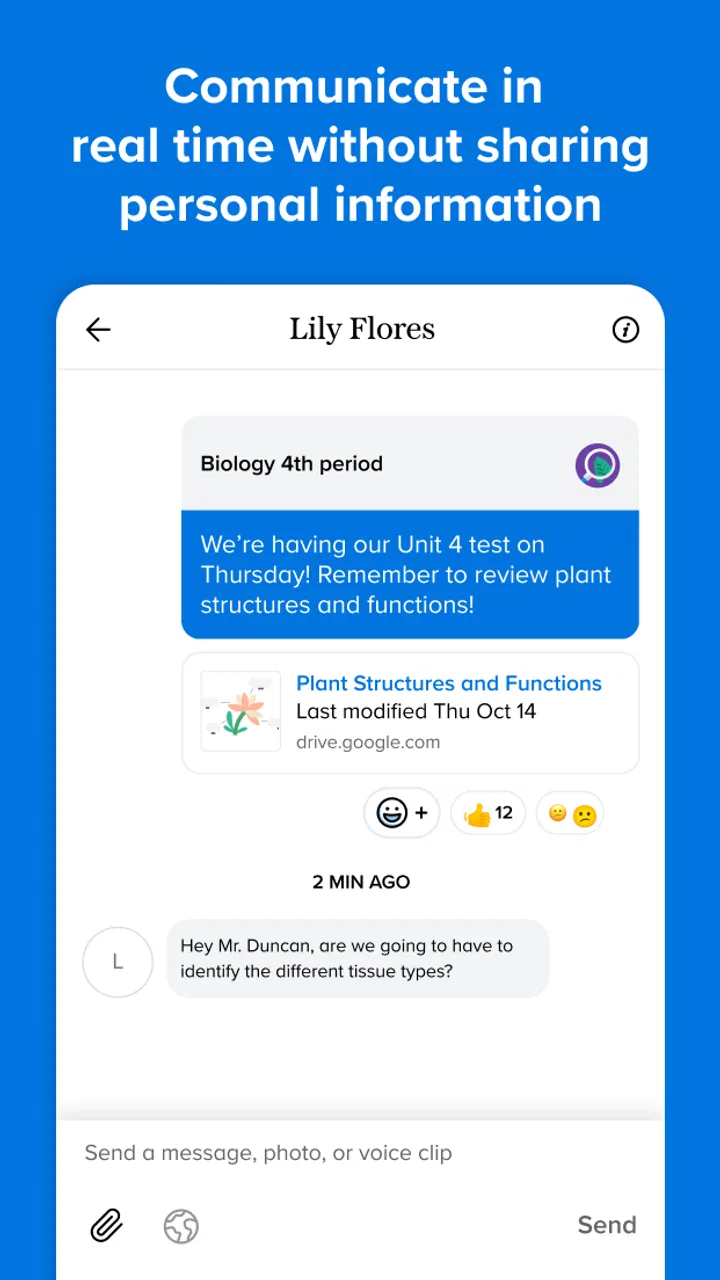
The first thing I noticed is that the app's value depends less on visual excitement and more on whether the right message reaches the right people at the right moment. A teacher can use a class-based communication space for announcements, while families can keep school conversations separate from personal messaging apps. That separation is helpful: school information does not have to compete with family group chats, work messages, or social notifications.
You May Also Like

 Blood Strike: 2.5 Anniversary
Blood Strike’s Loadouts Turn Every Drop Into a Tactical Gamble
A close look at Blood Strike’s custom loadouts: how fast access to signature weapons reshapes its battle royale rhythm, rewards preparation, and narrows the gap between fights.

 Pandora - Music & Podcasts
Pandora’s Music Is Easy to Start, but Harder to Recover
Pandora’s strength is its low-effort path from a seed to a station. Its weak spot is how much confidence it asks you to place in connection, setup, and quiet recovery.

 8 Ball Pool
 Is Built on Rivalries, Rematches, and Routine
A close look at the rivalries, rematches, shared routines, and unanswered safety questions that turn a quick pool match into a persistent mobile community.

 Samsung Music
’s Quiet Strength Is Playing What You Already Own
Its reach comes less from spectacle than from dependable access to a personal library. That simplicity is both the app’s strongest retention engine and its ceiling.

 AccuWeather: Weather Radar
AccuWeather Review: A Quick, Clear Forecast for Everyday Decisions
For everyday plans, the best forecast is the one you can understand quickly. AccuWeather makes rain timing, radar, and local conditions easy to act on, with a few trade-offs.

 Hill Climb Racing
Why Hill Climb Racing Still Turns Crashes Into One More Run
A tiny car, a bumpy hill and one more upgrade: Hill Climb Racing keeps resurfacing because its simple chaos makes every near-miss feel personal.
More From Our News Desk



In a realistic weekday situation, I can imagine a teacher sending a reminder about a changed pickup arrangement or an upcoming classroom activity, while parents check the message during a short break rather than searching through several email chains. The app makes that kind of update feel more deliberate. It is particularly useful when a message needs to reach many families at once and repeating the same information individually would waste time.
The important trade-off is that Remind is only as effective as the school's adoption of it. If one teacher uses it, another relies on email, and a third communicates through a separate school portal, parents still have to monitor multiple places. The app can simplify communication, but it cannot create a single system when a school has not agreed on one.
What the app does well for teachers and families
For teachers, the strongest use case is routine communication that does not deserve a long formal email. A short reminder, a schedule change, or a note about something students should bring can be easier to send through a dedicated school channel. For families, the benefit is context. A message connected to a class or school contact is easier to understand than an unexpected text from an unfamiliar number.
I also like the boundary it creates between personal contact details and school communication. Parents may prefer not to exchange personal phone numbers with every teacher, and teachers may not want their private messaging accounts mixed with classroom responsibilities. A purpose-built education app gives both sides a more appropriate setting for those exchanges.
There is another less obvious benefit: it can make communication more consistent for families who are not able to attend every school event or speak with staff at pickup. A parent working irregular hours, sharing custody, or managing several children can check the same communication channel when available. That does not solve every scheduling problem, but it reduces dependence on being physically present at a particular time.
Speed expectations and the effect of the app's focused design
In normal use, I would expect Remind to feel quicker than a large school portal because its purpose is narrower. A communication app does not need to present every grade, assignment, attendance record, and course resource before the user can understand a simple announcement. That focused design should make checking a message feel like a short task rather than a visit to an entire digital campus.
Perceived speed still depends on the phone, network connection, and the amount of activity happening in the account. Opening a brief message and checking a recent update is a lighter job than moving through a busy class communication history. I would not judge the app by how fast it displays a single notification alone; the more meaningful question is whether it helps me find the latest school information without unnecessary steps.
One practical habit improves the experience: I would use the app for current communication and avoid treating it as a permanent archive for every school document. If a teacher sends a detailed file, a long explanation, or information needed months later, I would save the important details elsewhere. That keeps the communication stream useful instead of turning it into an unmanageable record.
The app's public scale also gives some context for its role. It has an average rating of 4.3 from around 228 thousand ratings and more than 10 million installs, so this is not a niche experiment used by only a handful of classrooms. Those figures do not guarantee a perfect experience for every school, but they suggest that the basic communication model is familiar to a substantial number of Android users.
Heavy-use moments are where organization matters most
Remind is likely to feel most valuable during periods when schools send several updates close together: the beginning of a term, event preparation, weather-related changes, exam reminders, or end-of-year arrangements. These are also the moments when any communication app can become harder to manage. A stream that feels wonderfully simple with one message a week may require more attention when several classes and teachers are active.
For a parent with children in different grades, the main challenge is not necessarily sending or receiving one message. It is recognizing which class a message belongs to and deciding what needs action. I would recommend developing a quick routine: open new messages at a predictable time, identify anything with a deadline or change of plan, and immediately add those details to the calendar or notes system I already use. Remind can deliver the information, but I would not rely on memory to manage several school schedules.
Teachers can also benefit from a small amount of discipline. A message should begin with the action or change, followed by the relevant date and context. That is not a technical requirement of the app, but it makes the communication stream far more useful on a phone. A vague announcement may be easy to send yet still force families to ask follow-up questions.
Another trade-off appears when communication becomes interactive. A short announcement is efficient, but a complicated discussion can produce a long chain that is difficult to scan. For sensitive matters, detailed student concerns, or conversations requiring several back-and-forth replies, a private meeting or the school's formal contact process may be more suitable. Remind is convenient, but convenience should not replace judgment about the kind of conversation taking place.
Reliability, stability, and recovering from missed information
For a school communication app, reliability means more than staying open. The important test is whether I can return later, understand what was sent, and act on it without guessing. Remind is most dependable as a channel for timely updates when teachers and families use it consistently. The communication model is clear enough that a parent can check the app as part of a normal school-day routine.
Still, I would not treat any notification as the only safeguard for an important appointment or schedule change. Notifications can be overlooked, muted, delayed by a phone's background settings, or lost among other alerts. If a message affects transportation, childcare, or a deadline, I would read it inside the app and record the essential detail separately. That is a sensible recovery habit for any notification-based service.
If I missed several days of messages, I would avoid scrolling casually and assuming I had caught everything. I would work backward from the most recent communication, look for changes that affect the current week, and check with the school if something remains unclear. The app can help preserve the conversation, but it cannot know which older message matters most to my family.
Stability can also be affected by the wider setup around the app. A teacher may post an update, a school may change its communication practice, or a family may switch devices. In those situations, the problem may feel like an app failure even when the real issue is inconsistent use. My advice is to confirm which class or school channel is official before assuming that a quiet feed means there is nothing happening.
Remind101 has kept the product available as a long-running education app, released on October 5, 2012. Its current version is 15.6.4, which shows that the app is actively maintained as a modern product rather than being an untouched legacy download. I would still keep the app updated, particularly if communication is important, because current versions are generally the sensible starting point for compatibility and issue recovery.
Device constraints and the cost of keeping it installed
The minimum operating system is Android 9, so users with older phones should check compatibility before planning around it. For people using a reasonably current Android device, the app's focused role should make it less demanding than a platform built around video lessons, large document libraries, or constant media playback. I would expect ordinary message checking to be a lighter task than using a full virtual classroom.
That does not mean device resources are irrelevant. A phone with very limited storage, aggressive battery management, or restricted background activity may handle notifications differently from a newer device. If messages seem late, I would first check whether the phone is delaying notifications or limiting the app in the background, rather than immediately concluding that the service itself is unreliable.
Families sharing one older device may also find the experience less convenient than families with regular individual access. Remind is useful when the intended recipient can check messages promptly. If a parent rarely has access to the registered phone, the communication advantage becomes weaker and another school-approved arrangement may be necessary.
The Everyone content rating makes the app broadly approachable for school communities, but that should not be confused with suitability for every communication situation. The rating describes general audience access; it does not remove the need for adults to use sound judgment when discussing student information or deciding which details belong in a group message.
How it compares with email, texting, and complete school portals
Email remains a strong alternative for long explanations, formal records, attachments, and communication that needs a subject line and a searchable inbox. I would choose email when a message requires careful detail or when I need to include several documents. Remind feels better for short, timely school updates that should stay connected to a class rather than disappear inside a crowded personal inbox.
Ordinary texting can be faster for a small group, but it blurs personal and school boundaries. It may also make it harder to identify whether a message is official, current, or connected to the correct classroom. Remind's education-specific setting gives school communication a clearer home, even if texting remains more familiar for urgent personal contact.
A full school portal is usually the better choice when I need grades, attendance, assignments, calendars, payments, or formal records in one place. Remind should not be evaluated as a replacement for those systems. Its advantage is immediacy and simplicity, while the portal's advantage is depth and administration. In a well-organized school, the two can serve different purposes rather than compete directly.
There is also a human comparison worth making. A school may have an excellent platform but still communicate poorly if staff use it inconsistently. Conversely, a modest communication tool can feel very effective when teachers write clear messages and families know where to look. Remind's success is therefore partly a workflow decision, not just a software decision.
Who should use it, and who may be better served elsewhere
I would recommend Remind to parents and guardians who want a dedicated channel for classroom announcements, teachers who need a straightforward way to reach families, and school communities trying to reduce dependence on paper notices. It is especially sensible when the school has already adopted it across several classes, because the benefit grows when fewer updates are split between unrelated services.
It is less suitable for someone searching for a complete home-learning environment. If I needed live instruction, extensive course material, detailed progress tracking, or a central academic record, I would look to the school's main learning platform instead. I would also hesitate to depend on it as the only route for urgent emergencies unless the school explicitly says that it is part of its emergency communication plan.
Families who dislike notifications may need to adjust their habits rather than abandon the app immediately. The answer is not to allow every alert to interrupt the day, nor to mute everything and hope to remember to check. A scheduled review of school messages can provide a better balance, provided the school's timing makes that practical.
The free price is a meaningful advantage for families deciding whether to try it, and the app's broad age rating removes an obvious barrier to general school use. Even so, the real cost is attention: someone has to check the channel, interpret the message, and transfer important dates into a personal routine. No communication app can eliminate that responsibility.
My performance verdict after weighing speed, stability, and real use
My overall impression is that Remind is strongest when it stays in its lane. It offers a focused way to receive and send school communication, and that focus should make everyday checking feel lighter than navigating a full academic portal. It is not a demanding media-heavy tool by design, so I would expect ordinary message use to be manageable on compatible devices, while notification behavior and network conditions remain important variables.
The most useful advanced habit is to treat it as the first step in a communication workflow, not the entire workflow. Read the update, identify the action, record the date somewhere dependable, and use the school's formal process when the subject becomes complex or sensitive. That approach preserves Remind's speed without asking it to perform the job of a calendar, archive, gradebook, or emergency system.
I also appreciate that its limitations are easy to understand. Inconsistent school adoption can weaken its value, busy communication periods can require better organization, and missed notifications still need a recovery plan. Those are genuine concerns, but they do not cancel out the app's usefulness for the right audience.
With a 4.3 average and around 72 thousand written reviews, it has earned a substantial amount of user attention, while its free availability makes experimentation straightforward. I would install it when my child's school or teacher uses it as an official communication channel, especially if email updates are easy to miss. I would skip making it my only school tool when I need academic records, extensive coursework, or guaranteed emergency delivery.
In short, I see Remind as a practical communication companion rather than a complete education platform. When the school community uses it consistently and messages are written clearly, it can make everyday updates easier to notice and easier to separate from personal life. Its best quality is not a long list of extras; it is the simple relief of having school messages in a place that is meant for school.
FAQs for Remind: School Communication
01What is Remind: School Communication used for?
Remind: School Communication is designed to facilitate communication between teachers, students, and parents. It allows for the sharing of important announcements, assignments, and schedules in an organized manner. The app supports direct messaging and group notifications, making it easier for everyone to stay informed and engaged.
02Is Remind: School Communication free to use?
Yes, Remind offers a free basic version that includes essential features for communication. However, there are premium options available for schools or districts that require additional functionalities, such as advanced analytics and integrations with other educational tools. These premium features come with a subscription fee.
03How secure is the communication on Remind?
Remind prioritizes user privacy and security. The app uses encryption to protect messages and complies with relevant privacy laws, including FERPA and COPPA. Additionally, phone numbers are kept private, and users communicate through the app’s platform, ensuring a secure environment for all participants.
04Can Remind be used on multiple devices?
Yes, Remind is accessible on various devices. It is available as a mobile app on both Android and iOS, and it can also be accessed via a web browser. This flexibility ensures that users can stay connected whether they are using a smartphone, tablet, or computer.
05What languages does Remind support?
Remind supports multiple languages, making it accessible to a diverse user base. The app’s default language is English, but it includes options for other languages to accommodate non-English speakers. This feature ensures effective communication across different linguistic backgrounds in educational settings.
Pros
- Easy-to-use interface for all users.
- Instant notifications keep you updated.
- Supports multimedia messaging.
- Works across platforms seamlessly.
- Great for organizing class schedules.
Cons
- Limited features in free version.
- Requires internet for full functionality.
- Notification overload for active groups.
- No direct parent-teacher chat option.
- Group size restrictions in free tier.

Remind: School Communication
Gallery